Plan your stay
Check meter limits and upcoming restrictions against the time you want to park.
 CurbwiseNYC
A little local knowledge.
New York parking has a lot of fine print. See the rules for your curb, how they affect your stay, and what changes next.
Available for iPhone, iPad and Android. Free download.
Made for New YorkTHE CURB, EXPLAINED
Check meter limits and upcoming restrictions against the time you want to park.
Explore mapped signs and rules for the section of street you’re considering.
See the reason behind an assessment, then confirm the signs at your spot.
A COUPLE OF REAL APP EXAMPLES
Go beyond a color on the map. See the rule behind it.
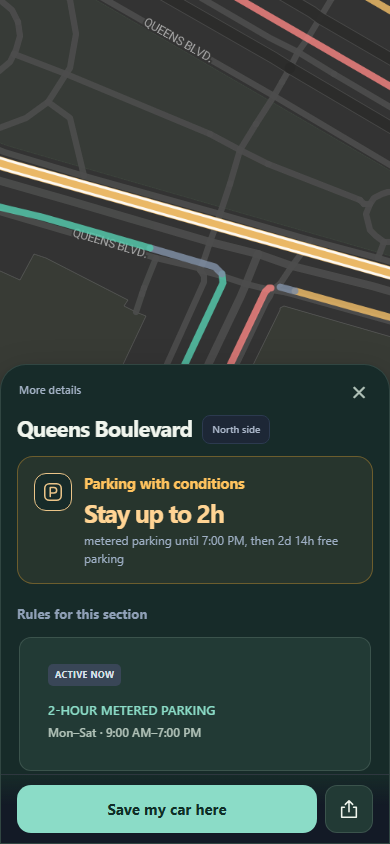
This example shows a two-hour limit while the meter rule is active. Curbwise puts that limit beside the schedule that explains it.
“Stay up to 2h” summarizes the active time limit.
The displayed rule runs Monday–Saturday, 9 AM–7 PM.
Confirm signs, pay the meter when required, and check for temporary restrictions.
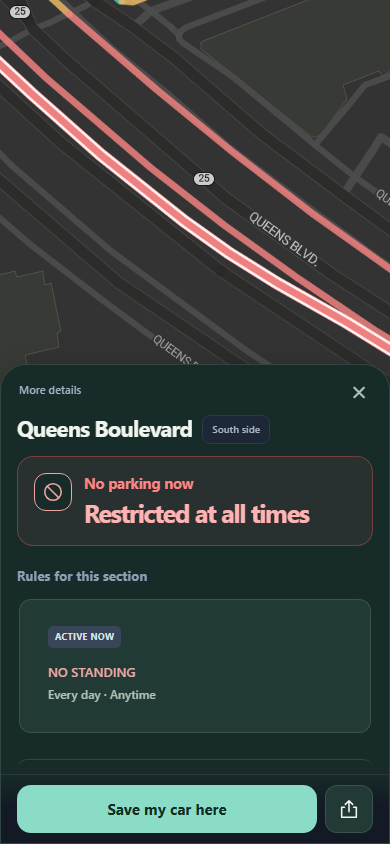
On this curb, the mapped rule is “No Standing,” every day, at any time. The app explains why the section is restricted instead of leaving you to guess.
Every day · Anytime
A nearby curb can have a different rule. Check the street side and the signs along the exact section where you intend to park.
Actual app captures from September 5, 2026; the interface has since been updated. These illustrate how rules are explained, not current parking permission or space availability. Map imagery: © Stadia Maps, © OpenMapTiles, © OpenStreetMap contributors.
THE REST OF YOUR PARKING ROUTINE
Save your car’s location and an optional note, then get walking directions back.
Choose a reminder before the next applicable rule. Always verify your deadline; notifications can be delayed.
See nearby licensed garages and lots when street parking doesn’t fit your plans.
START WITH A LOOK AROUND
Browse basic curb assessments without an account. Sign in for a 7-day trial of full rules and signs, with 10 curb views a day.
GOOD TO KNOW
No. It explains available data and estimates how rules affect your stay. It does not reserve spaces, show live vacancies, or guarantee protection from a ticket or tow. Check signs, meters, hydrants, driveways, crosswalks and temporary notices at the actual curb.
Basic map browsing is free without signing in. A new account gets a 7-day trial with 10 full curb-detail views a day. Optional Curbwise Premium Monthly is US$5.00/month in the U.S. App Store and includes 60 curb views a day. Other usage limits apply; daily allowances reset at 00:00 UTC.
On Android, Google Play shows the price and billing period before you confirm a subscription.
The trial never converts automatically. A subscription starts billing when you confirm it through the applicable store, including during the trial, and renews unless cancelled before renewal. For Apple subscriptions, cancel at least 24 hours before renewal. Read the terms.
Curbwise covers New York City’s five boroughs. You can search an NYC address from anywhere; location permission is optional. Download it from the App Store for iPhone and iPad or Google Play for Android.
Curbwise combines published NYC curb, parking sign and regulation data, along with available construction and event notices. Sources can be incomplete or outdated, and a mapped rule is not a check of current street conditions.
In Curbwise, sign in, select the curb and choose “Report an issue” so we receive the relevant curb details. For account or app help, email hello@curbwise.dev or visit Support.
HERE TO HELP